
VoiceSort
Save photos into folders and name them by voice. Say a caption and VoiceSort prints it on the photo.
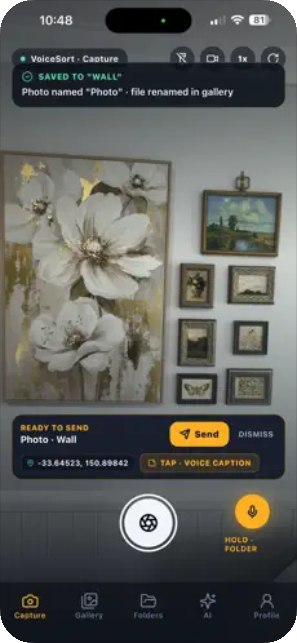
Three steps, no typing.
- Hold the mic and say the folder name.
- Take the photo and say its name. VoiceSort saves it into the folder and labels it with that name.
- Tap Voice Caption and say a caption of up to 10 seconds. VoiceSort prints it as text on the photo.
Features
Folders by voice
Say a new folder name and the photos you take go into that folder.
Photo names by voice
Say a name and the photo is labelled with it.
Captions on the photo
Say up to 10 seconds of audio and it is printed on the photo as text.
AI sorting
AI arranges your photos into new folders by location, name, time and date.
VoiceSort offers a Premium subscription. Prices and details are on the App Store listing.
Help with VoiceSort
Email solutions@bfrtech.com.au and include your iPhone model and iOS version.
How do I restore a purchase?
Open the subscription screen in the app and tap Restore Purchases. Use the same Apple ID you bought with.
How do I cancel my subscription?
Apple manages subscriptions. On your iPhone open Settings, tap your name, tap Subscriptions, choose VoiceSort and tap Cancel Subscription.
Which devices does VoiceSort run on?
VoiceSort is an iOS app for iPhone.
How is my voice and photo data used?
See section 3 of the VoiceSort Privacy Policy.